Progress
Weight Tracker App With Progress Photos and Body Fat %
A weight tracker app built around progress photos: log weight and body-fat % with each session, typed in or read from Apple Health, and see both together.
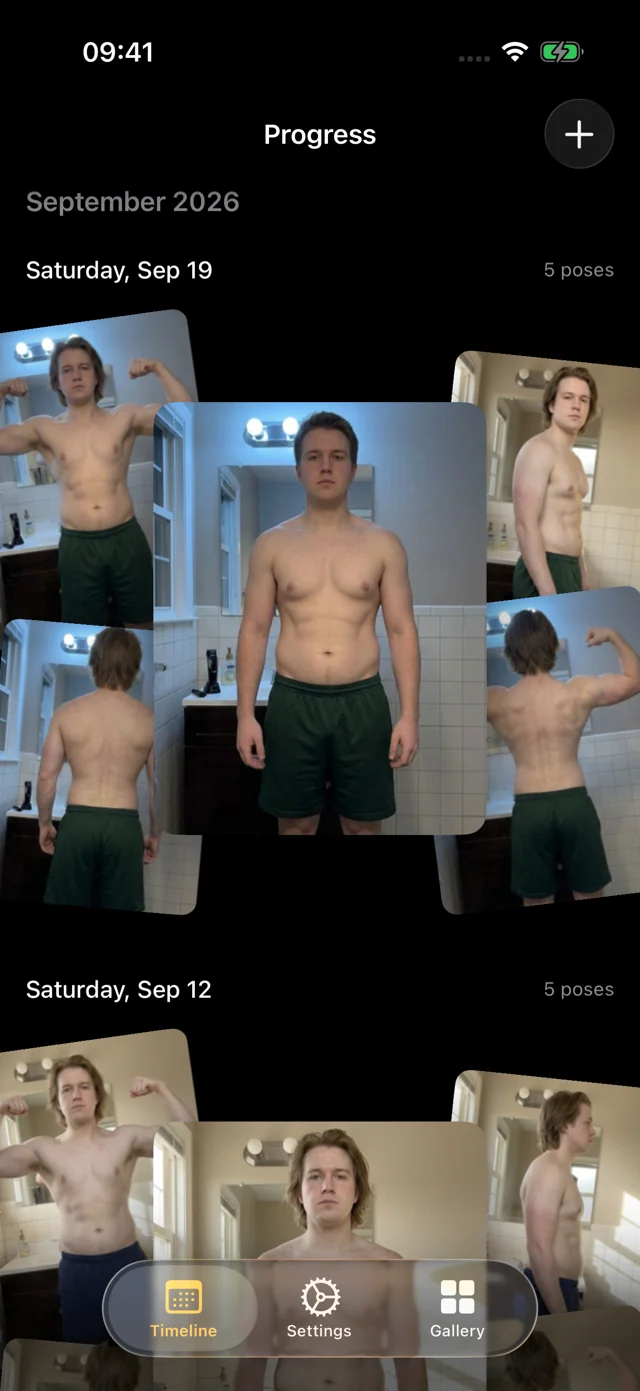
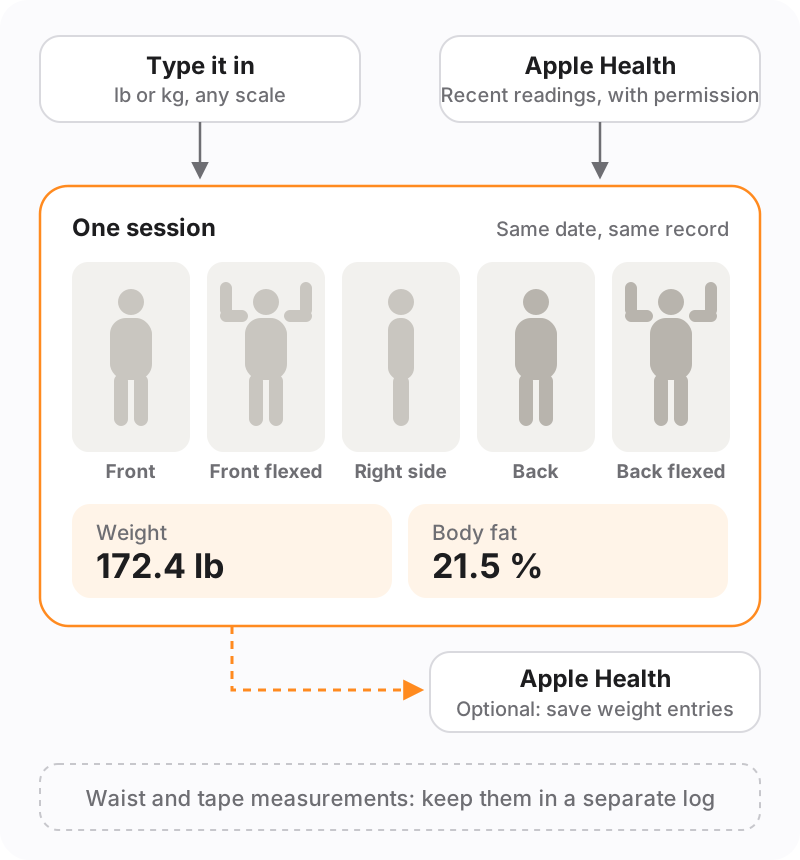
A scale tells you one number; photos show where it came from. Progress is a progress photo app with a simple weight tracker built in: log your weight and body-fat percentage with each photo session, typed in or read from Apple Health with your permission, and the numbers stay with the photos they belong to. Progress can also save your weight entries to Apple Health.
Key takeaways
- Each session holds five photos plus weight and body-fat percentage.
- Type the numbers in, or let Progress read recent readings from Apple Health.
- Optionally save weight entries back to Apple Health, so your other apps see them.
- Progress doesn't track tape measurements. Keep those in a separate log.
When the scale stalls but the photos change
You've been consistent for two months. The scale dropped for the first few weeks, then sat in the same three-pound band for a month. On the number alone, it looks like nothing is happening.
Illustrative data: eight weeks of daily weigh-ins starting near 186 lb. The 7-day average falls for four weeks, then holds flat for four more while daily readings keep bouncing by a few pounds.
Daily weigh-ins swing with water, salt, carbs and sleep, so a few flat weeks are often noise rather than a true plateau. The water weight calculator shows how much a salty dinner or a hard training day can move the scale on its own, and our guide to the weight loss plateau explains how to tell a real stall from a temporary one.
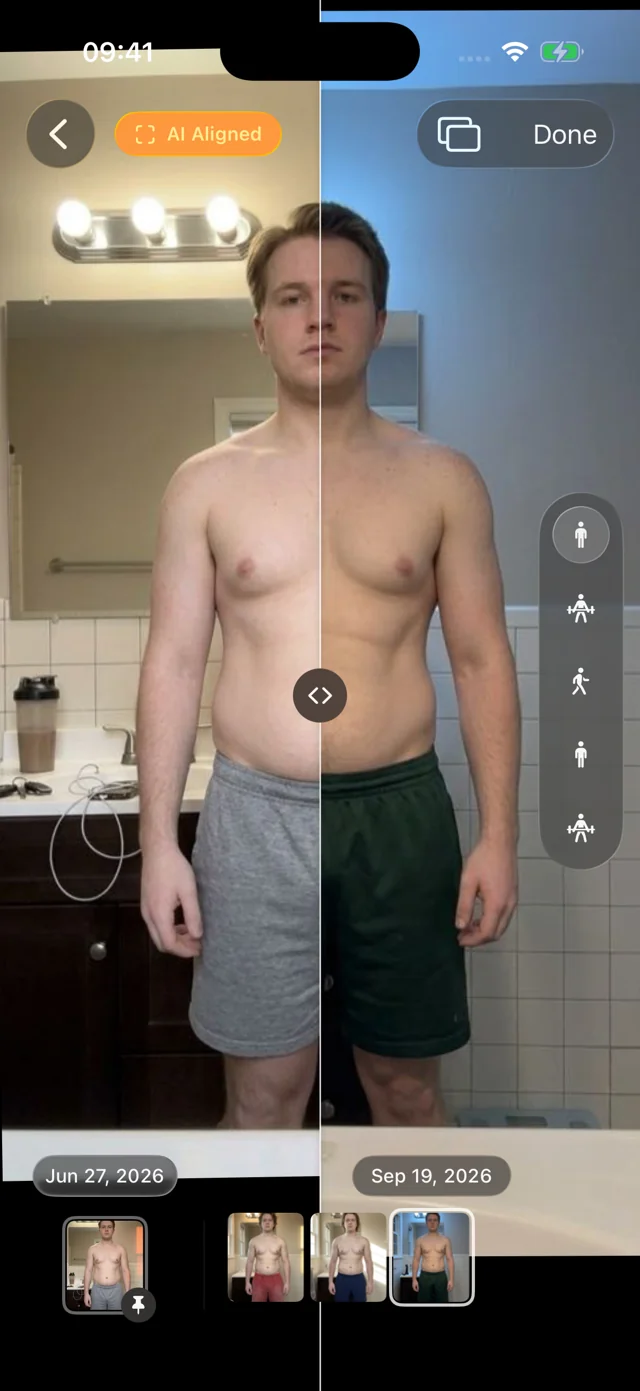
Photos settle it. Your weight is logged with the same session as your photos, so you can compare two dates and see both: the number that barely moved and a side view that clearly did.

Apple Health in, weight out
If your smart scale writes to Apple Health, turn on reading and Progress fills in new sessions for you: weight from the previous 24 hours and body fat from the previous 30 days. You can still edit either number, choose a different unit for one entry, or type your own.
Turn on saving and the weights you type into Progress go to Apple Health, so your other apps stay in sync. Either direction can be turned off later without losing what's recorded.
Prefer to keep Health out of it? Just type the number, in pounds or kilograms.
Body-fat percentage, from whatever you measure with
Progress stores the body-fat percentage you give it, from a smart scale, a DEXA scan, calipers or a tape-based calculator. Methods can disagree by several points, so pick one, stick with it, and read the trend rather than any single number.
Curious what your number looks like? Our guide to body fat percentage pictures shows what different ranges tend to look like, and the free body fat percentage calculator estimates it from a few tape measurements.
What Progress doesn't track
Progress isn't a full body measurements tracker. It keeps weight and body-fat percentage with each session.
| What | In Progress | Where else |
|---|---|---|
| Weight | Yes, per session | Apple Health |
| Body-fat % | Yes, per session | Apple Health |
| Progress photos | Yes, five poses per session | — |
| Waist, hips, chest, arms | No | A notes app, spreadsheet or paper log |
| Steps, calories, workouts | No | Apple Health or your training app |
Tape measurements are still worth taking, especially during a recomp, when your waist can shrink while your weight holds. Measure every two to four weeks at the same spots, and note the date of the matching photo session. Our guide on how to take body measurements covers where to put the tape and how to keep readings consistent.
How it works
- Join the beta. Install Apple's TestFlight app, then join the free Progress beta on iPhone or iPad with iOS or iPadOS 26 or later.
- Connect Apple Health, or don't. In Settings, allow Progress to read weight and body fat, and optionally to save weight.
- Take your set. Capture five poses hands-free, or import old photos.
- Add the numbers. Confirm the prefilled readings or type your own. They're saved with the session, beside its photos.
Your personal data (photos, measurements, health data) never leaves your iPhone. We only collect basic usage data to improve the app, and you can turn it off in Settings. More on that in private by design.
FAQ
What is the best free weight tracking app?
On iPhone, Apple Health is free, built in, and collects readings from most smart scales. If you also want progress photos beside each weight, Progress is a free beta that reads from and can write weight to Apple Health.
Is there a free body measurement tracker?
Apple Health can log some body measurements, and a simple spreadsheet works for tape measurements. Progress tracks weight and body-fat percentage alongside photos, but not tape measurements.
Why does my weight go up when I'm losing fat?
Usually water. Salt, carbohydrates, hard training, sleep and hormones all change how much water your body holds, which can mask fat loss for days or weeks. Watch the weekly trend, and compare photos a few weeks apart rather than day to day.
How often should I weigh myself?
Daily weigh-ins averaged over a week give the clearest trend; weekly works too if daily numbers stress you out. Either way, weigh at the same time, ideally in the morning before eating, and log one number per photo session in Progress.